The final devroom videos are now published on YouTube. These were generated by combining the in-camera recordings and livestream, denoising and normalizing audio. Each devroom has a separate playlist:
- AOSP. 8 videos
- Open Hardware 6 videos
- FOSS in Science 13 videos
- Open Data 9 videos
- Compilers, Programming Languages and Systems 7 videos
- Geopolitics and Policy in FOSS 6 videos
That’s 48 videos in total - like almost 50% of the conference talks…
We also live-streamed the conference - the main track and 4 devrooms. We couldn’t livestream the Compilers and Policy devrooms.
Audi 1/2, devroom 1(Audi) 3 and devroom 2 all had varying but similar setups, documented here. Audi 1/2 followed last years livestreaming scheme more or less (vendor camera+our livestreaming setup), with both devrooms being owned by us. Idea was to own and experiment with a part of the conference and see how we fare, and how we can manage costs.
FOSS
@Jeswin made a new set of delightful templates for this year… primarily for the livestream. The templates clearly labelled the session and speaker details on screen.
We built FOSS:
- OBS scene loader for talk screen templates. We handled 100+ sessions including the main track and the livestream. We pre-generated image templates to show the talk title and the speakers, and imported these into OBS. Volunteers had to switch the templates manually, based on was happening on stage.
- Scripts and workflows to master the final video using a software pipeline. This repository also includes generation of images from talk templates, video editing process and workflow and 3d models of our “video box” (see image below)
- OBS plugin to follow USB video and audio sources across cable disconnects
- ngnix rtmp setup work to ensure no livestream drop in the face of network disconnects.
(3) and (4) were not used during the conference. But they are generically useful, and will be deployed in the future. We also put together some functional “video recording boxes”:
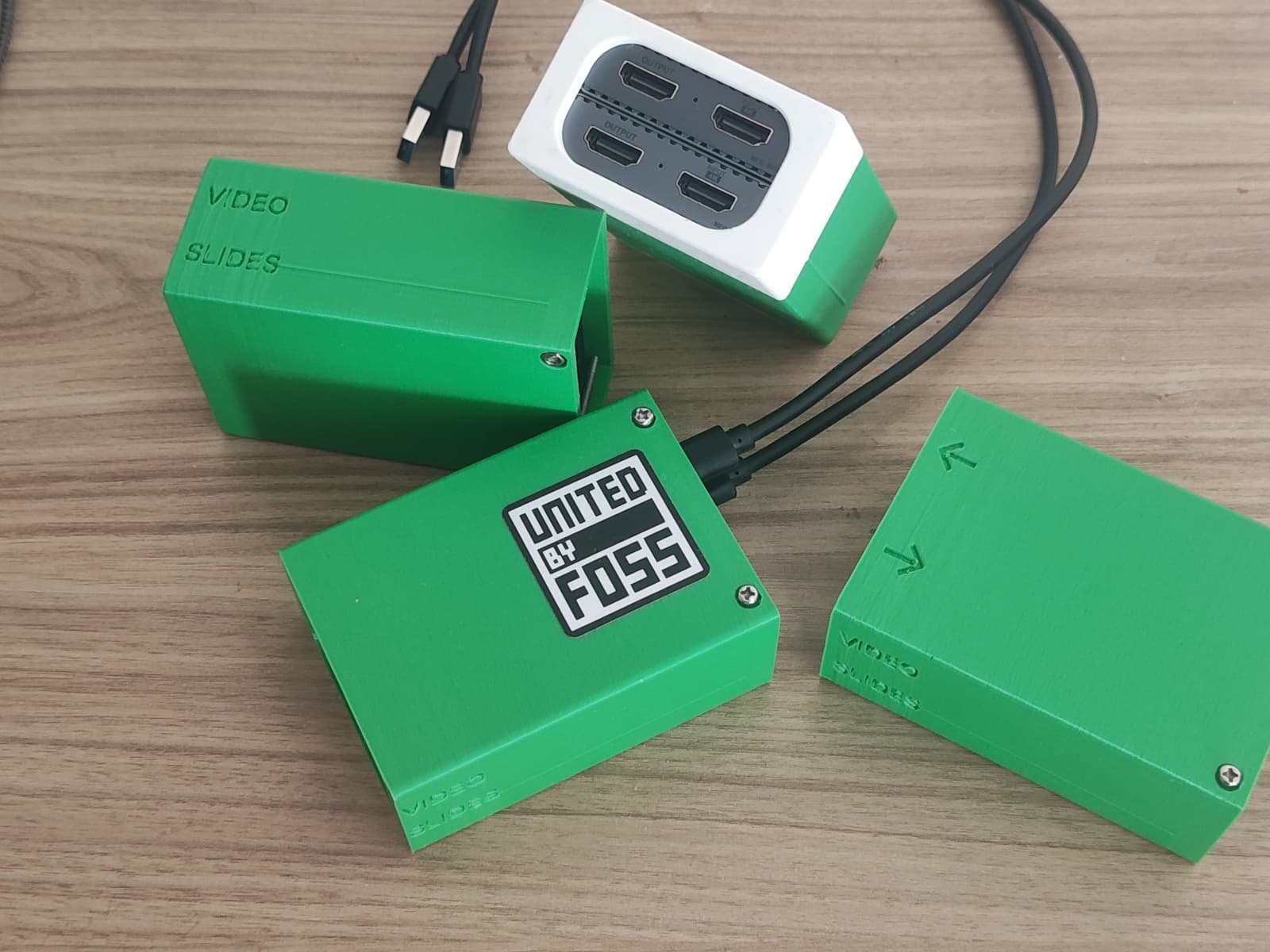
And of course we used FOSS as well:
- FreeCAD for making the case, sliced with Prusa slicer, and printed on a Prusa i3 MK2.
- OBS studio for live-streaming
- Inkscape to export the image templates
- ffmpeg for editing videos.
- audalign python module for aligning the in-camera video timestamps with livestream captures.
- sox for denoising the audio track of the final cut videos
We also had a fair share of philosophical debates around YouTube, free software based hosting (Peertube), etc. Those will remain the fun, undocumented bits. I started looking around for volunteers at the end of July and we got a few, which ended up with 2 active volunteers Yasir and Muneer. We had various meetings, but it’s fair to say that most of the work actually happened in the last 2-3 weeks. We had mostly Sunday 9 PM calls. Many of these are documented in this thread. We also took input from the previous livestream team - @Arya_Kiran and @mangesh .
Credits
This video team consisted of @Mohd_Yasir_K_N , @Muneer_S , and @Shree_Kumar . Yasir played a lead role in running the livestream, with Muneer playing a very active role in both setup, monitoring and general cheerleading. I spent time conceptualizing, developing, coordinating (during the event) and editing.
The USB video capture device (PiBox VC-304-D) itself was first shortlisted, 2 were ordered and tested for a few days (doesn’t get warm, good quality output with acceptable caveats, etc), and then we ordered 8 more - with the 2 extra as spares.
We collectively decided the video equipment based on : technical specs to achieve high quality (eye tracking auto-focus performance low light performance, video quality), availability of equipment for rent, cost, ease of use, and ease of management (uniformity across the 4 recording stations).
We also got good Laptops from Zerodha (Vishnu). I was a bit worried about getting Ethernet, and 2+ USB 3.0 ports on a single laptop; was pleasantly surprised to see that the enterprise laptops have retained Ethernet in a slim avatar…
Finally, the livestream setup was overall managed by 20+ student volunteers from Dayanand Sagar collge of Engineering(Pointblank club), MSRIT and RVCE.
Budget
| Expense Group | Includes | Cost (including GST) | Budgeted Under |
|---|---|---|---|
| Equipment rentals, Technical personnel | 2 sets of (Sony FX 3 camera, lenses, tripod, all day power and cables). Audio equipment for devroom 2. Technician cost for 2 days (1400 day 1, double rate on day 2 - sunday), Technician travel | 42,151 | IndiaFOSS 2025 |
| HDMI video capture cards | 10 PiBox video capture cards | 15,600 | FOSS United |
We own the video capture cards. So, these are budgeted under FOSS United budget (and not the IndiaFOSS budget). And will use these in future events. How exactly is TBD.
The Good
Most of the conference was live-streamed - main tracks (audi 1,2), and devroom 1(audi 3).
The Final edited videos try to make the thing “fun” to watch. The cuts and transitions in the videos were chosen to engage viewers better and throw a light on the personality of the speakers as best as possible. A much better job is possible, but the current videos set a good beginning. My top “cut” picks:
- Homelabbing with Bare Metal from the hardware devroom. This features 17 transitions, an attempt to present better what was showed on stage as the presenter switched between a raspberry pi, various pieces of hardware, aluminium extrusions, racks and what not ending with his “cube”.
- From the data devroom : the first few minutes of Maps, Masala and Missed Buses, Political Archives on the Internet - will certainly draw you in. The talks themselves are very good. And the recording and editing play a part too.
My point with the editing is simple : it will take “geeks” who are invested in FOSS to do a good job of editing. Others won’t listen to the talk and edit based on it to suit.
IMHO, final edited videos are at a quality level that’s higher than many other conferences. I’d love to hear thoughts on how our videos compare against any other conferences (e.g. FOSDEM) ! Known issues are documented in the “bad” listed later in this post.
The videos cameras were managed by technicians. Daily rates for these folks are set by a camera workers union with minimum rates, 2x rate on sundays. The vendor wouldn’t give us the cameras without the technicians as security measure for expensive equipment, so we went with this. This offloaded the devroom volunteers a bit, as otherwise they’d have to manage the camera tracking the speaker (which was the plan). Not bad for 10k spend over 2 days. We ran 6, but we could have run 8 devrooms in this.
Student volunteers were enlisted on a 50-50 volunteering basis. 1 day volunteering + 1 day conference. Good model. The task was well defined, and the students did a good job of this.
The Bad
On day 1, Audi 2 livestream was delayed (few talks). Audi 1 livestream started well after the first talk underway. Audi 3 livestream started midway through the devroom.
Video switching from the speaker to the audience (during QA) leaves much to be desired. In some cases the same camera was used, which wasn’t supposed to be the case.
We also didn’t use a LAN connection on day 1, though this was planned.
We also didn’t get the time to meaningfully train the devrooms in any way. The policy devroom shifted to the workshop room (mimicing an un-conference!). Due to this, the videos throw a lot of light on the speaker, but make the slides on the TV much harder to read in the videos.
We also made some technical mistakes:
- In-camera video recordings are at 25 FPS. Should have been 60

- The livestream video got recorded in 720p from Science and Data devrooms. This was probably due to us not setting the video resolution in the stream key, coupled with YT thinking somehow that we’re on a low bandwidth. The final recorded videos are 1080p - meaning the slide parts are upscaled 2x for the video. This causes the slides part of the talk to be lower quality than we’d wish. (The AOSP devroom spared us some blushes as they recorded the livestream locally at 1080p for both AOSP and Open Hardware)
The livestream templates had talk tiltles. In some cases the order of talks changed - but that didn’t reflect in the templates. So some segments were incorrectly labelled in the livestream. These mistakes are corrected in the final videos.
We haven’t yet received all the processed videos of the main track, so we can’t yet compare the quality of our videos with what the “professional” vendor will deliver. However, the vendor hasn’t changed, and if the quality of their output (ref: IF 2024 videos) does not go up, then we might handily beat them in both AV quality and AV editing in most cases…
From a cost perspective, the devroom video experiment shows how we can do much better with “technical volunteering”. We can’t do an apples to apples comparison with video vendor ( 2.24 L+ costs vs our 50k), as the deliverables aren’t the same. However, it’s not hard to make a case at this point that we’re better off finding and nurturing more volunteers rather than outsourcing to vendors (anybody with a decent enough camera can get us speaker photos - it’s a no brainer! And just look at this reel)
The devrooms spent a good amount of time fiddling with cables, converters and stuff to get the laptop showing up on the projector. In at-least in one case, the intro of the speaker was done and 2 minutes elapsed before the slides were up.
At-least one speaker from a devroom felt unhappy comparing the video of their talk (from Devroom 2) to other talks from Devroom 1 (Audi 3). This was unintended, but a somewhat sad consequence of us not recording the slides. To some extent this also had to do with the overall setup : Audi 3 is pleasant and well illuminated etc. The other devroom was not so well lit. I think this is a human angle that we’ll have to consider next time.
The Ugly
We had an audio issue in Audi 1 which derailed our plans majorly. Vendor was supposed to get a cable (which he had promised just the previous night), but he didn’t. This had a cascading effect on the entire live-stream, as we hadn’t anticipated this and hadn’t prepared for it. On day 2 also we had a bit of a scramble in the morning - maybe we relaxed too much
- We didn’t livestream Devroom 2 - Compiilers and Policy.
- Worse, we didn’t record the presentation video (slides) for Devroom 2 talks. The video covers both the TV(slides) and the speaker. Our cameras are great at eye tracking autofocus. The flip side is that this causes the slides to be not so sharp in the video. Due to this our edited videos for these two devrooms have a much lower quality in terms of legibility of slides in many cases.
- All devrooms : The livestream audio was a massive hit/miss.
- Projector in audi 3 was set to 4:3 aspect ratio all the way till Data devroom observed this and got it fixed.
- The podium is an eyesore in the videos
IndiaFOSS 2026
We will look to move the quality bar higher next year. Here’s how we will do that:
- Work through the year to make the entire process smooth and ready-to-use - “plug and play”. Live-stream monthly meetups or maybe some other CityFOSS conferences, involve more volunteers, iterate and wrap up by next July!
- Standardize and/or own audio. Feed audio to vendors (to their audio system), but don’t “take” audio (and noise) from them.
- We’ may add some additional lighting next year for the speakers, especially if it gives us much better quality at an incremental cost. We may do color grading as well.
- Improve and make our own “video setup” - take the best of ideas (affordable) tech, and make it an easy to use system. We have to test various audio solutions for this. Cameras will be continue to be on a rental basis.
- Train devroom volunteers in some of the nuances of video recording/production using both videos and documentation.
- Come up with better ways of editing - mix of automation, involvement of speakers/devrooms where possible and our editing as a fallback.
- Enable devrooms to have edit access to the website/schedule/talk metadata, etc Setup collaborator access in youtube in advance so that there’s no single control for hitting the “Go Live” button. Basically devroom managers must have all the “self service” options

- Enlist more volunteers for IF 26 AV team
 We’ll look to involve more of community talent for both shooting photos, videos and editing. And also the tech that powers the venue shooting and processing.